From Biometric Devices to Payroll: How eHajira Connects Your HR Workflow
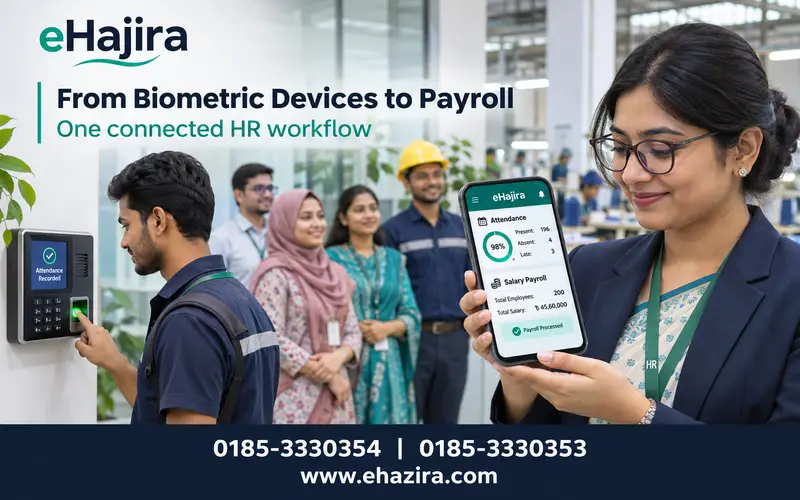
A biometric device can record when an employee checks in, but that punch is only the start of an HR process. A business still needs to match the event to the right person and shift, review late arrivals or missing punches, apply approved leave and overtime rules, and prepare payroll records that managers can verify. eHajira connects these steps through its HR, attendance, leave, shift and payroll
In this article
- 01 Introduction
- 02 Why connected HR workflows matter in Bangladesh
- 03 From biometric punch to payroll record
- 04 Attendance capture that matches the worksite
- 05 Shifts, rosters and overtime approvals
- 06 Leave, holidays and attendance reconciliation
- 07 Payroll controls, reporting and accountability
- 08 How eHajira fits the Bangladesh market
- 09 A buyer’s implementation checklist
- 10 Conclusion
- 11 Frequently asked questions
Introduction
A biometric device can record when an employee checks in, but that punch is only the start of an HR process. A business still needs to match the event to the right person and shift, review late arrivals or missing punches, apply approved leave and overtime rules, and prepare payroll records that managers can verify. eHajira connects these steps through its HR, attendance, leave, shift and payroll workflows, giving Bangladesh employers a practical way to move from raw punch data to reviewed workforce records.
For a buyer searching for the best HR, payroll and attendance software in Bangladesh, the best choice is the system that fits the organization’s devices, policies, workforce and support requirements. eHajira is a strong candidate for businesses that want biometric and mobile attendance alongside employee records, shifts, leave administration, reporting and payroll functions in one platform. A live demonstration and pilot using the company’s actual rules should confirm the fit before rollout.
Why connected HR workflows matter in Bangladesh
Bangladesh’s large manufacturing and service economy creates varied attendance needs. BGMEA’s export-performance page lists approximately US$38.7 billion in ready-made garment exports for FY2025–26. BGMEA’s ESG platform describes a sector of around 4,000 registered member factories and more than four million workers; the platform’s 2025–26 survey wave covers 326 factories, a sample rather than a census of the full sector. These figures signal the scale and operational diversity of apparel employment, but they do not measure HR software adoption or establish market share for any vendor.
Beyond garments, factories, hospitals, schools, retailers, logistics providers, ISPs and service companies manage different combinations of office staff, shift teams, field employees, branches and contract workers. A small company may need a few biometric terminals and straightforward payroll review. A multi-site operation may need branch-level access, rotating rosters, department reports, mobile attendance for selected field roles and a controlled monthly payroll close. Buying software by feature count alone can leave these practical workflows unresolved.
Bangladesh’s Economic Census 2024 reporting covers economic units, persons engaged, business operations, legal compliance, technology use and enterprise size. That breadth reinforces a useful buying principle: select a system based on the employer’s actual workforce model and operating maturity, not on assumptions that every organization has the same data quality, internet access or HR staffing.
From biometric punch to payroll record
A connected workflow begins with an employee profile. HR assigns a unique employee ID and records the information needed for the organization’s process, such as department, designation, branch, employment status and approved salary components. The employee identifier used by the attendance terminal must map correctly to this profile. Duplicate IDs, departed employees left active and inconsistent department names can create downstream errors even when the device captures every punch correctly.
Next, the biometric terminal captures an event such as an in-punch or out-punch. Depending on the supported device model and connection method, attendance records may sync to the software through a local network, an approved push connection or another integration method. Buyers should confirm the exact model, firmware, protocol, data direction and recovery process. ‘Compatible with biometric devices’ is not enough detail: punch synchronization, uploading user profiles and transferring fingerprint or face templates are separate capabilities and may have different model requirements.
The software then interprets the punch against an assigned schedule. It can help HR review attendance time, late arrivals, early departures, breaks, missing punches and overtime, subject to the configured product and policy. The raw event should remain traceable. When an authorized supervisor corrects a missing punch or status, a reason, approver and timestamp help explain the change instead of obscuring the original record.
Finally, payroll staff review the attendance and leave outcomes that feed salary calculations. They resolve exceptions, verify approved overtime, check pay-period boundaries and compare the resulting pay run with established policy. The system can calculate configured payroll rules and produce reports or payslips when those functions are enabled, but software output still needs review by responsible HR and finance staff.
Attendance capture that matches the worksite
Biometric attendance is useful where employees report through a known entry point. Fingerprint, face or card-based terminals can reduce manual entry and help create consistent time records. The right choice depends on throughput, environment, hygiene requirements, user experience and device capability. Before purchase, test the terminal with representative employees and confirm how it behaves during power or network interruptions, duplicate punches, failed reads and clock drift.
Mobile attendance can complement a fixed device for approved roles such as field officers, service engineers, sales staff or employees assigned to more than one site. eHajira’s product information describes mobile attendance options and location-related features. Businesses should decide which roles may use mobile check-in, what evidence is collected, and how managers review exceptions. Location tracking should be disclosed and limited to a documented business purpose. GPS can be less precise near buildings and industrial equipment, and location history cannot prove the quality of work by itself.
Mobile location buffering and attendance punching are separate functions. The organization should verify whether the selected app supports offline attendance punching before relying on it. Do not infer that stored GPS route points mean check-in events can also be created offline. For fixed factory teams, a biometric terminal may remain the primary capture point, while mobile features serve specific, authorized use cases.
Shifts, rosters and overtime approvals
Attendance becomes meaningful when it is checked against the right schedule. A workforce system should let the employer define day, night, rotating or other shift patterns, assign them by employee or team, and set effective dates. Cross-midnight shifts need special testing: the system must associate punches with the intended work date, apply breaks correctly and handle a shift that starts on one calendar date and ends on the next.
For changing rosters, ask the vendor to show how schedules are prepared, published, revised and locked. A controlled process helps supervisors and employees see the schedule that was approved, while making later edits traceable. Check whether the system warns about overlapping shifts, missing assignments, insufficient rest intervals or unapproved changes if those controls are required by company policy and available in the selected edition.
Recorded time and approved overtime should remain distinguishable. A worker may stay beyond scheduled hours, but that does not automatically mean the time is authorized overtime or should be paid under a specific rule. The employer should document who requests, reviews and approves overtime, configure applicable rules with qualified advisers, and test the result against sample cases before payroll goes live.
Leave, holidays and attendance reconciliation
Leave management connects employee requests with staffing and attendance records. A useful workflow records the leave type, date range, request, reviewer, status and balance where applicable. Supervisors can use approved leave information to plan coverage. HR can check pending and completed requests by employee, department or date, subject to access permissions.
The link between approved leave and attendance deserves particular attention. If an employee was marked absent before a leave request was approved, the configured process should recalculate that date so the approved status is reflected correctly. Employers should test this case, as well as leave that overlaps with a holiday, weekly rest day, partial shift or night-shift boundary. Leave entitlements and accrual rules vary by policy and employee category; the software should implement rules approved by the employer rather than invent them.
Before each payroll close, HR should reconcile attendance exceptions, approved leave, late waivers, early departures, breaks, shift changes and overtime approvals. A payroll checklist can assign owners and deadlines so unresolved exceptions are not silently carried into salary calculations.
Payroll controls, reporting and accountability
Payroll accuracy depends on clean employee data and reviewed time records. Employers should identify salary components, effective dates, deductions, allowances, overtime treatment and rounding rules, then validate the configuration with payroll specialists. Where wage-board or grade-based structures apply, the company should maintain the approved rates and effective dates and update them through a controlled change process.
Run parallel payroll before full adoption. Select a representative period and compare software output with the existing approved payroll method. Include regular and night shifts, approved leave, an absent day, a missed punch correction, late waiver, half-day, new employee, termination or salary revision, and approved overtime. Investigate every difference and retain sign-off. A software demonstration using only a simple day shift will not reveal boundary errors.
Reports should help managers answer operational questions: who is present by branch, where are missing punches, which leave requests need review, what shift coverage is incomplete, and which overtime hours await approval? HR and finance may need different permissions. Role-based access, audit history, secure account practices, backup and restoration procedures, export options and support response times should be evaluated during procurement.
The Bangladesh Labour Act and subsequent amendments contain requirements related to worker registers, working time, rest, leave and overtime. The Ministry of Labour and Employment lists the Bangladesh Labour (Amendment) Act 2026. Because applicability depends on current law, establishment type and worker category, employers should obtain qualified legal or HR advice and validate configurations against the provisions that apply to them. HR software can help maintain and review records; it does not itself guarantee compliance.
How eHajira fits the Bangladesh market
eHajira is offered by TRIMATRIK IT LTD as HR, attendance and payroll software. Published product information describes employee management, cloud-based attendance, leave management and payroll. Depending on the plan and implementation, organizations can evaluate biometric device attendance, mobile attendance, shift and roster functions, overtime handling, reports and employee self-service. Exact modules, device compatibility and entitlements should be confirmed in a current quotation and demonstration.
The platform can be assessed as a fit for Bangladesh companies that want to connect attendance records with HR review and salary preparation. A garment factory may focus on biometric terminals, multiple shifts, leave reconciliation, overtime approvals and payroll reports. A service company may prioritize mobile attendance for field staff, department visibility and employee self-service. A multi-branch business may evaluate location structure, permissions, data exports and consolidated reporting.
The practical value is the workflow, not a claim that any product eliminates every attendance or payroll error. eHajira can help centralize processes and make configured records easier to review. The employer still defines policy, maintains accurate employee data, checks device setup and approves exceptions. Before selecting eHajira, request a demonstration with the company’s real biometric model, shifts, leave rules, payroll examples, user roles and reporting needs.
A buyer’s implementation checklist
A staged rollout usually lowers operational disruption. Start with a discovery session to map sites, employee categories, schedules, current devices, payroll cycles, approval paths and source data. Clean employee IDs and department lists before import. Confirm the device integration and test punch mapping with a small, representative group.
Next, configure attendance, shifts, leave types, holidays, approvals and salary components. Ask the vendor to document assumptions and settings. Train HR, supervisors, payroll users and administrators around their actual tasks. Run a pilot across more than one shift or department, record defects, and retest after changes. During parallel payroll, reconcile totals and exceptions. Only then set a controlled go-live date and define who monitors issues during the first cycles.
Include total cost in the business case: subscriptions, setup, device integration, data cleanup, training, additional branches or devices, messaging if used, internal staff time and ongoing support. Compare proposals on the same scope. Ask what is included, how response times work, how data can be exported and what happens if an employee’s role changes or the company adds a location.
Conclusion
Connecting biometric devices to payroll requires more than collecting punches. It requires accurate employee mapping, reliable shift rules, approved leave and overtime, exception review, traceable corrections and a tested payroll close. eHajira is a relevant HR, payroll and attendance software option for Bangladesh employers seeking these connected workflows, provided its current plan and device integration match the organization’s needs. Define the policy first, demonstrate actual scenarios, run a pilot and validate payroll results before full deployment.
Frequently asked questions
1. What is eHajira?
eHajira is an HR, attendance and payroll software product from TRIMATRIK IT LTD. Its published information describes employee, attendance, leave and payroll functions; confirm current modules for the plan being considered.
2. How does eHajira connect biometric devices to payroll?
The device captures punch events, the software maps them to employee profiles and assigned schedules, HR reviews exceptions, and approved records can feed configured payroll calculations.
3. Is eHajira the best HR and payroll software in Bangladesh?
“Best” depends on business size, device compatibility, shifts, payroll rules, support and budget. eHajira is a strong local option to evaluate, but buyers should compare it against real workflows and run a pilot.
4. Which businesses in Bangladesh can use eHajira?
Garment factories, manufacturers, offices, retailers, schools, hospitals and service organizations can assess it where employee, attendance, leave or payroll workflows match the enabled modules.
5. Does eHajira support ZKTeco biometric attendance devices?
Compatibility depends on the exact device model, firmware, connection method and required functions. Confirm the exact model with the provider and test attendance synchronization before rollout.
6. Can eHajira use fingerprint and face attendance?
Biometric methods depend on the selected terminal and product integration. Confirm the device type, template handling and configuration for the specific deployment.
7. Can attendance data sync automatically?
Some compatible configurations can sync punch data. Ask the provider to demonstrate the actual device-to-software connection and explain what happens during network interruptions.
8. Can eHajira manage multiple shifts?
Published product information includes shift and roster functions in relevant configurations. Test day, night, rotating and cross-midnight schedules with the company’s actual rules.
9. Can eHajira handle overnight shifts?
A system must associate punches to the correct shift and work date across midnight. Test actual start and end times, breaks, holidays and payroll cutoffs in the customer’s configuration.
10. Can employees apply for leave through eHajira?
Leave management is included in published product information. Confirm whether employee self-service, request routing, balances and approval notifications are enabled in the selected package.
11. Does approved leave update attendance?
This depends on the configured leave-to-attendance process. Test a case where an absence was entered before a leave request was approved and verify the resulting report.
12. Can eHajira calculate payroll automatically?
Published product information includes payroll management. Salary calculations depend on configured components, approved time data, company rules and the functions available in the plan.
13. Can eHajira calculate overtime?
Overtime rules and calculations should be confirmed for the selected plan and configured policy. Keep recorded extra hours distinguishable from overtime that has been reviewed and approved.
14. Can payroll be checked before salary processing?
Yes. A sound workflow reviews attendance, leave, overtime, corrections and salary changes before the payroll period is finalized. Ask for reports and approval stages during the demo.
15. Can eHajira generate payslips and payroll reports?
These functions are described in product information for relevant configurations. Confirm the available report formats and employee access options for the selected package.
16. Can mobile attendance be used for field employees?
Mobile attendance may be appropriate for approved field roles. Confirm app requirements, permissions, location policy, connectivity behavior and package availability.
17. Does offline GPS mean offline attendance punching works?
No. GPS route buffering and offline attendance punching are separate capabilities. Verify offline punching explicitly if the business depends on it.
18. How does eHajira help reduce attendance errors?
It can centralize punch data, schedules, leave and correction review. Device mapping, employee data quality, policy clarity and approval discipline remain essential.
19. Does eHajira guarantee compliance with Bangladesh labour law?
No software should be treated as a legal guarantee. Employers should obtain qualified advice and configure the system for current requirements that apply to their establishment and worker categories.
20. How should a company test eHajira before buying?
Use a pilot that includes actual devices, multiple employee types, shifts, missing punches, leave, overtime, payroll, exports and role permissions. Compare the output with approved records.
21. Can eHajira support multiple branches?
Ask the provider to demonstrate branch setup, access permissions, reporting filters and consolidation for the proposed package and number of locations.
22. What information should be prepared before implementation?
Prepare employee IDs and profiles, departments, device records, shifts, holidays, leave rules, approval roles, payroll components and the current payroll reconciliation method.
23. What is the difference between punch import and biometric template transfer?
Punch import brings attendance events into the software. Employee profile synchronization and transfer of fingerprint or face templates are separate device functions with separate compatibility requirements.
24. How much does eHajira cost?
Pricing can depend on employee count, modules, devices, setup and support. Request a current written quotation covering recurring and one-time implementation costs.
25. Where can businesses in Bangladesh request an eHajira demo?
Visit www.ehazira.com or contact 0185-3330354 and 0185-3330353 to discuss requirements and request a demonstration.
Written by
eHajira Team
The eHajira team
Comments
No comments yet.